

· desktop application for
Identifies ambiguity.
Scientists decide.
A scientific spreadsheet cleaner and biological data validation workspace for research laboratories.
Xanthlonavia inspects messy experimental tables, flags structural inconsistencies, compares biological identifiers with curated references and shows every proposed change for your review before anything is applied.
The problem
Experimental tables carry more than data
Spreadsheets from instruments, collaborators and old projects arrive with converted gene names, outdated symbols, inconsistent missing values and layouts that analysis tools misread. Most of these are easy to miss and hard to fix consistently by hand.
| A | B | C | D | E | |
|---|---|---|---|---|---|
| 1 | Gene | Ensembl ID | Ct control | Ct treated | Conc. |
| 2 | TP53 | ENSG00000141510 | 24.31 | 26.02 | 5 µM |
| 3 | HER2 | ENSG00000141736 | 22.87 | 21.40 | 5 uM |
| 4 | 07-Sep | 27.66 | NA | 10 µM | |
| 5 | MARCH1 | 29.12 | 28.75 | 10 µM | |
| 6 | KRAS | ENSG00000133703 | 24.02 | 24,15 | 5 µM |
| 7 | PTEN | ENSG00000171862 | 25.77 | n.d. | −2.5 |
Names that changed
HER2 is an alias of ERBB2. MARCH1 became MARCHF1. Older tables use the names that were current when they were made.
Names Excel converted
SEPT7 typed into Excel can turn into a date such as 07-Sep and no longer looks like a gene.
Missing values written five ways
NA, n.d., blank cells, a dash. Some mean "not measured", some mean "below detection".
Numbers that are not numbers
Decimal commas, units inside cells, Unicode minus signs and numbers stored as text.
How it works
From messy data to reviewed scientific data
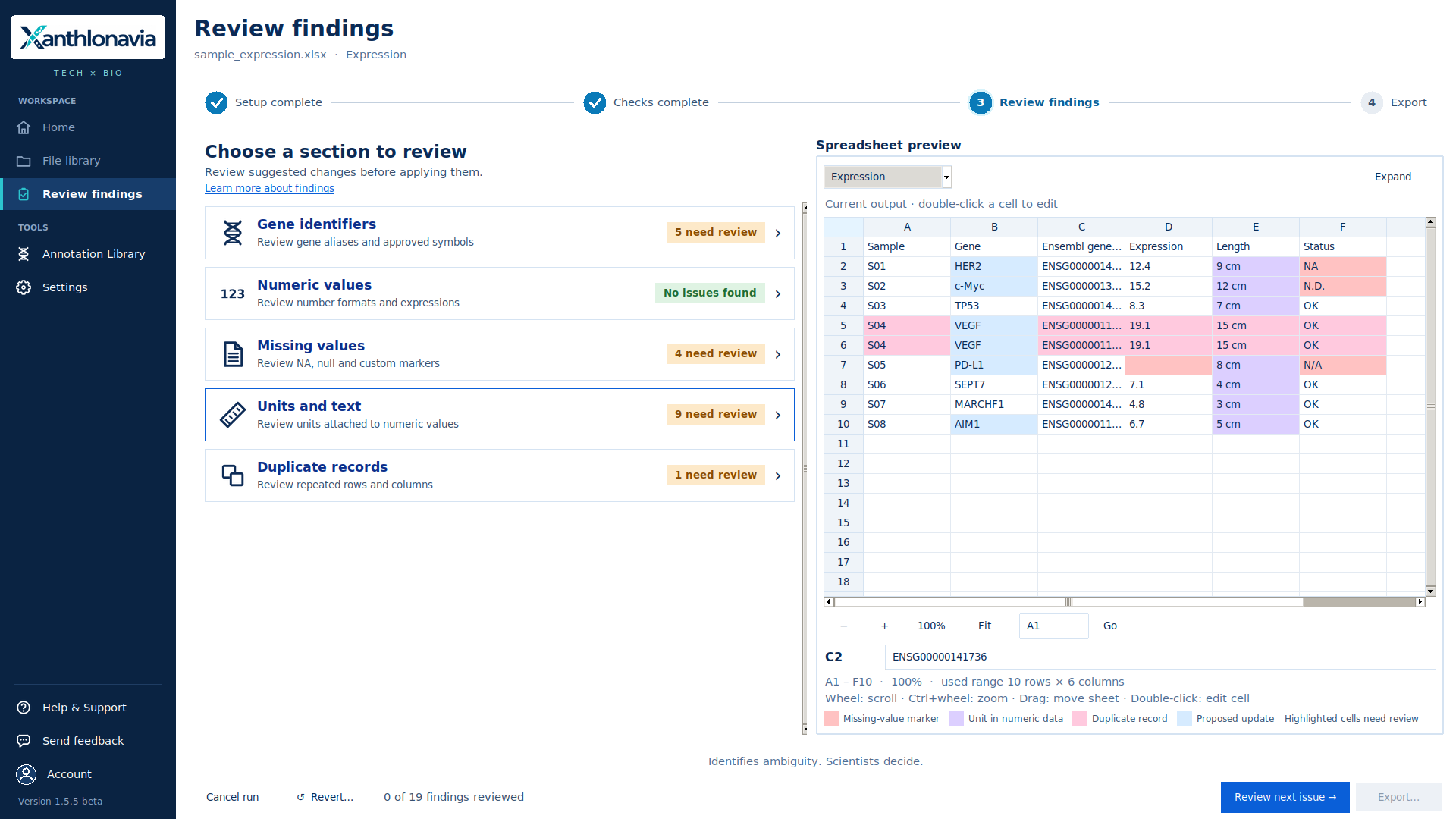
Select a step to see the screen it happens on. These are screenshots rendered from Xanthlonavia 1.5.5 using demonstration data and attached sample mappings.
Spreadsheet structure analysis
Finds the table inside the spreadsheet
Before anything is validated, Xanthlonavia works out how the workbook is laid out. Uncertain cases are shown to you; they are not resolved silently.
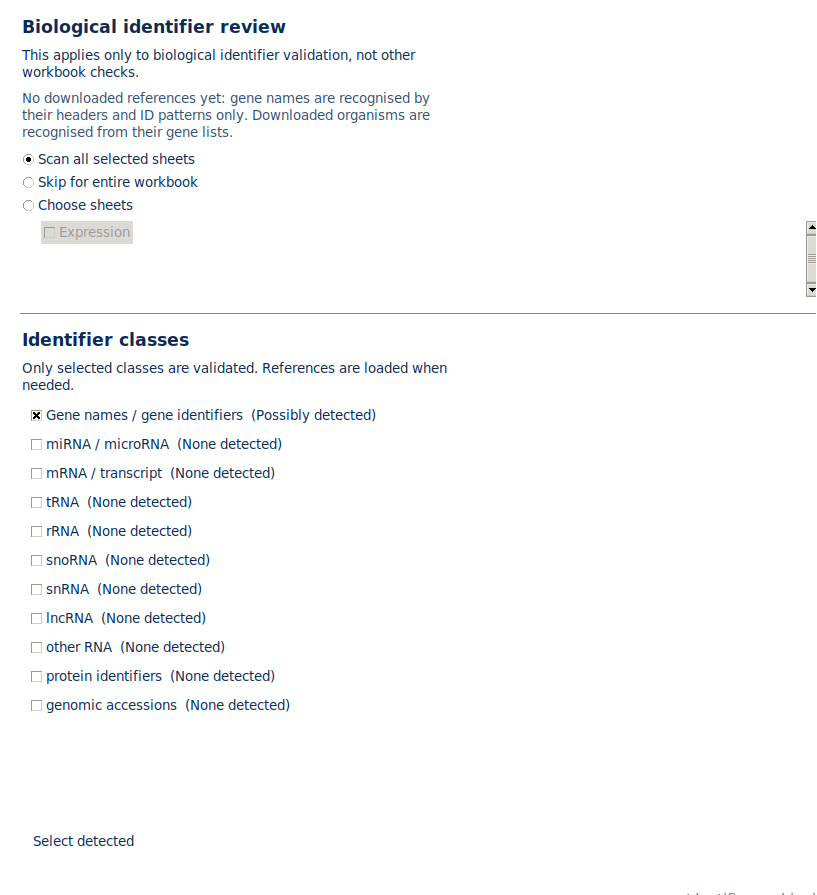
Biological validation
Understand biological identifiers, not just spreadsheet cells
Xanthlonavia compares detected identifiers with available curated reference datasets and surfaces possible mappings, inconsistencies and unresolved entries.
- Gene symbols, aliases and previous symbols
- Ensembl gene, transcript and protein IDs, including versioned IDs
- RefSeq and UniProt accessions, NCBI Gene and HGNC/MGI identifiers
- miRNA, tRNA, rRNA, snoRNA, snRNA, lncRNA, piRNA, RNAcentral and Rfam identifiers
- Locus tags and old locus tags where the reference provides them
You choose which identifier classes to validate. Coverage depends on the references available for each organism.
Identifier mappings
Every proposed mapping comes with its reason
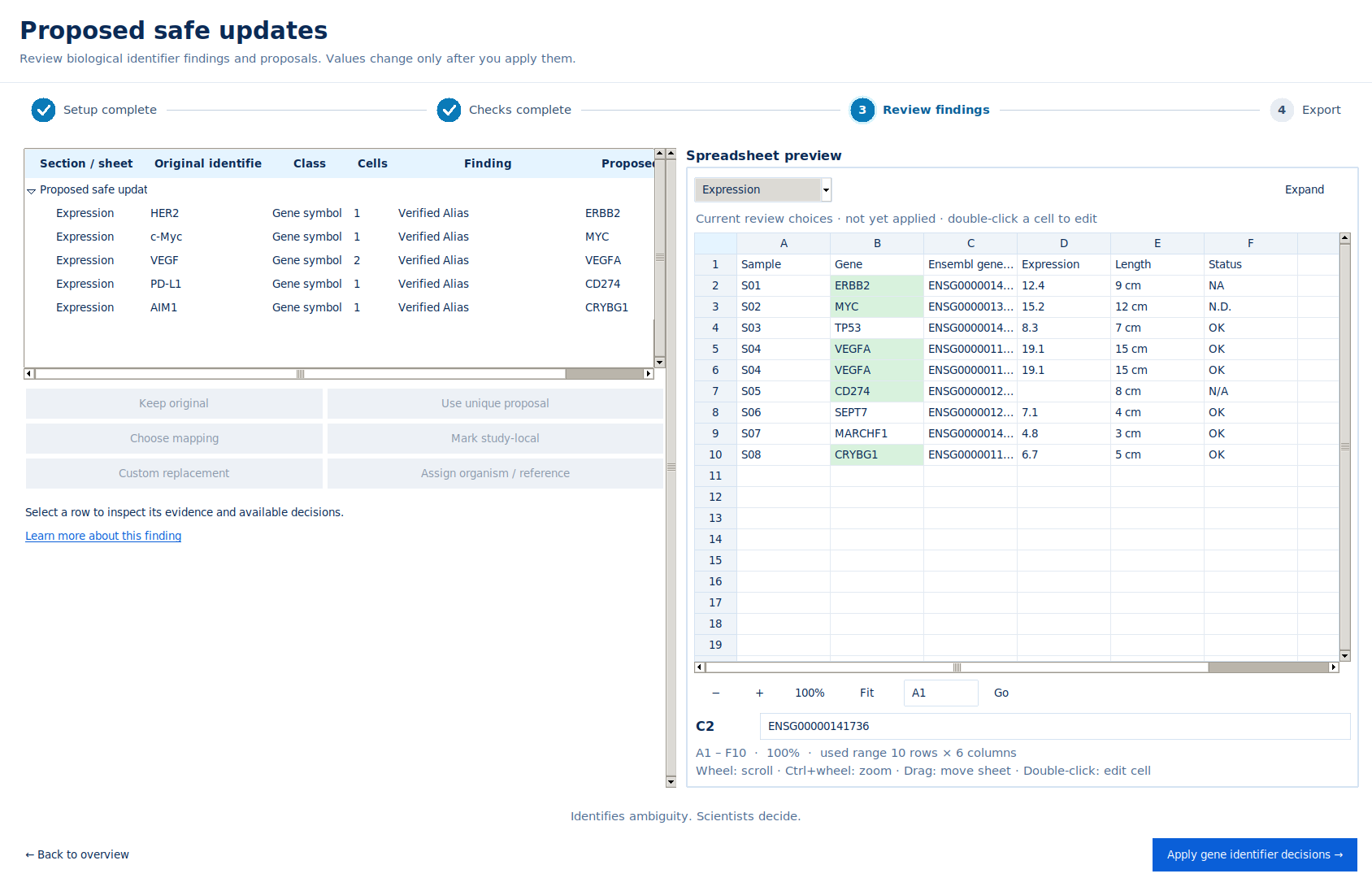
These illustrative examples show how human gene aliases and historical symbols can be reviewed against an applicable reference.
| In the spreadsheet | Proposed | Why | Outcome | |
|---|---|---|---|---|
| HER2 | → | ERBB2 | Listed as an alias of ERBB2 in the official gene list | Proposed safe update |
| c-Myc | → | MYC | Alias of MYC | Proposed safe update |
| 07-Sep | → | SEPTIN7 | A date Excel made from SEPT7, the previous symbol of SEPTIN7 | Proposed safe update |
| MARCH1 | → | MARCHF1 | Previous symbol of MARCHF1 | Proposed safe update |
| VEGF | → | VEGFA | Previous symbol of VEGFA | Proposed safe update |
| ENST… / ENSP… | → | gene | Transcript and protein IDs are linked to their gene in the reference | Validated |
| alias of 2 genes | → | ? | Two or more genes are possible and no official rename record settles it | Requires scientist review |
| retired ENSG | → | successor | Only when an Ensembl ID-history record names the successor; split IDs are left for you to choose | Reviewed by you |
Not found in the reference does not mean wrong. Identifiers that cannot be resolved are kept as they are and reported, never changed on a guess.
Scientist review model
Automation where appropriate. Review where necessary.
One reference-backed answer
Changes Xanthlonavia can propose with high confidence, for example a previous symbol or alias with exactly one official replacement. They are pre-selected for you, but nothing is written until you apply the section.
More than one reasonable answer
Cases involving ambiguity, multiple mappings, unavailable references or biological judgement. Xanthlonavia shows the candidates and the evidence. You choose, keep the original, or mark it as study-specific.
Identifies ambiguity. Scientists decide.
Annotation Download Library
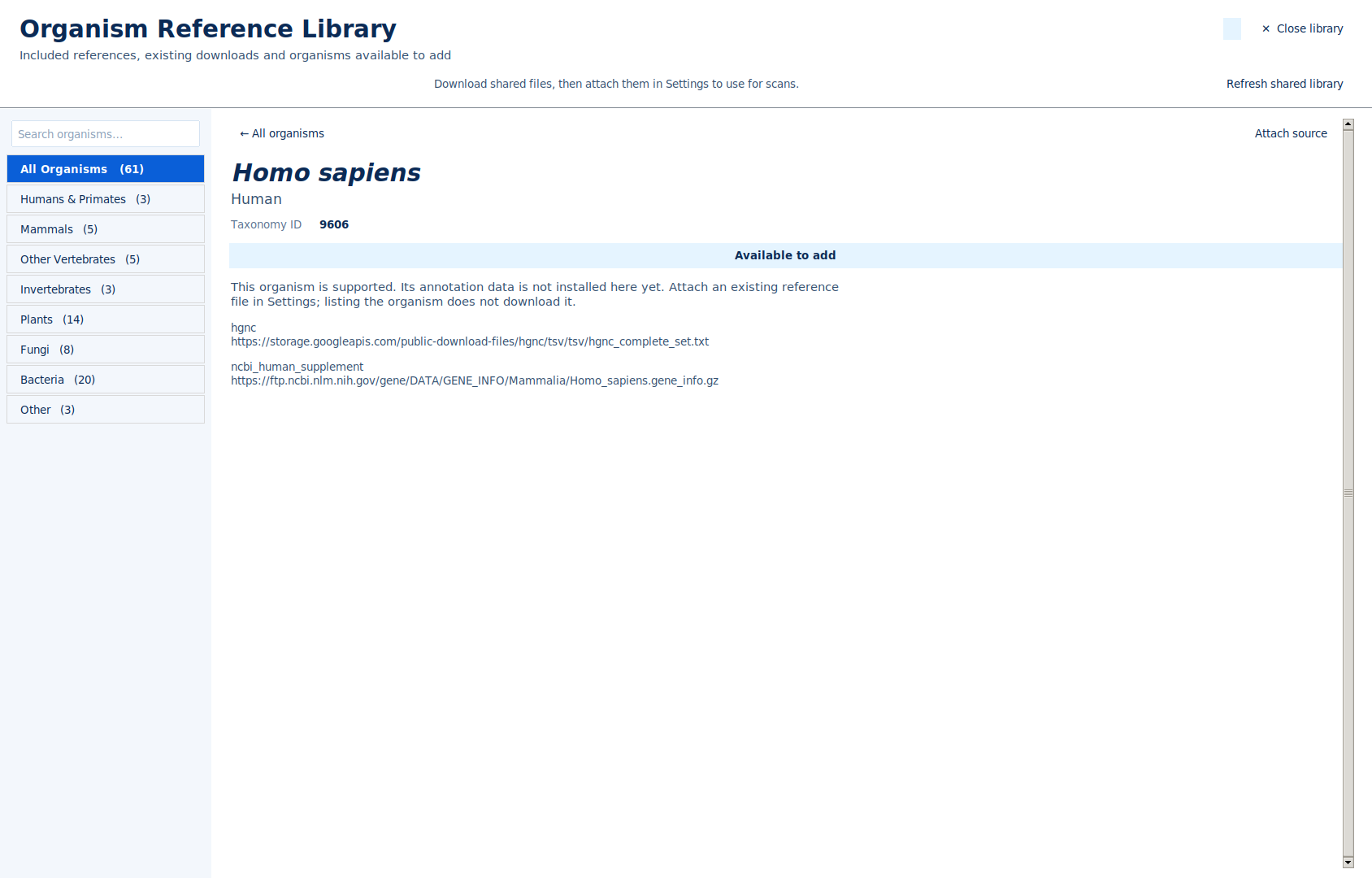
Curated reference files for selected organisms
Browse organisms inside Xanthlonavia and download the reference files that are available for each one, with their source, release and checksum.
The catalogue covers organisms across groups. Available file types differ between organisms.
Bring your own annotation data
Work with less common organisms and lab-specific references
If your organism or strain is not in the library, attach your own reference file and tell Xanthlonavia which organism it belongs to.
- GTF and GFF3 annotation (also gzip-compressed)
- TSV and CSV gene or mapping tables
- miRBase or other FASTA files for miRNA
- An assembly accession (GCF_/GCA_) can be specified; a file for a different assembly is rejected
Files added in Settings are kept for later scans. Files attached during a review are used for that session.
Missing-value detection
Tell intentional gaps from unexpected content
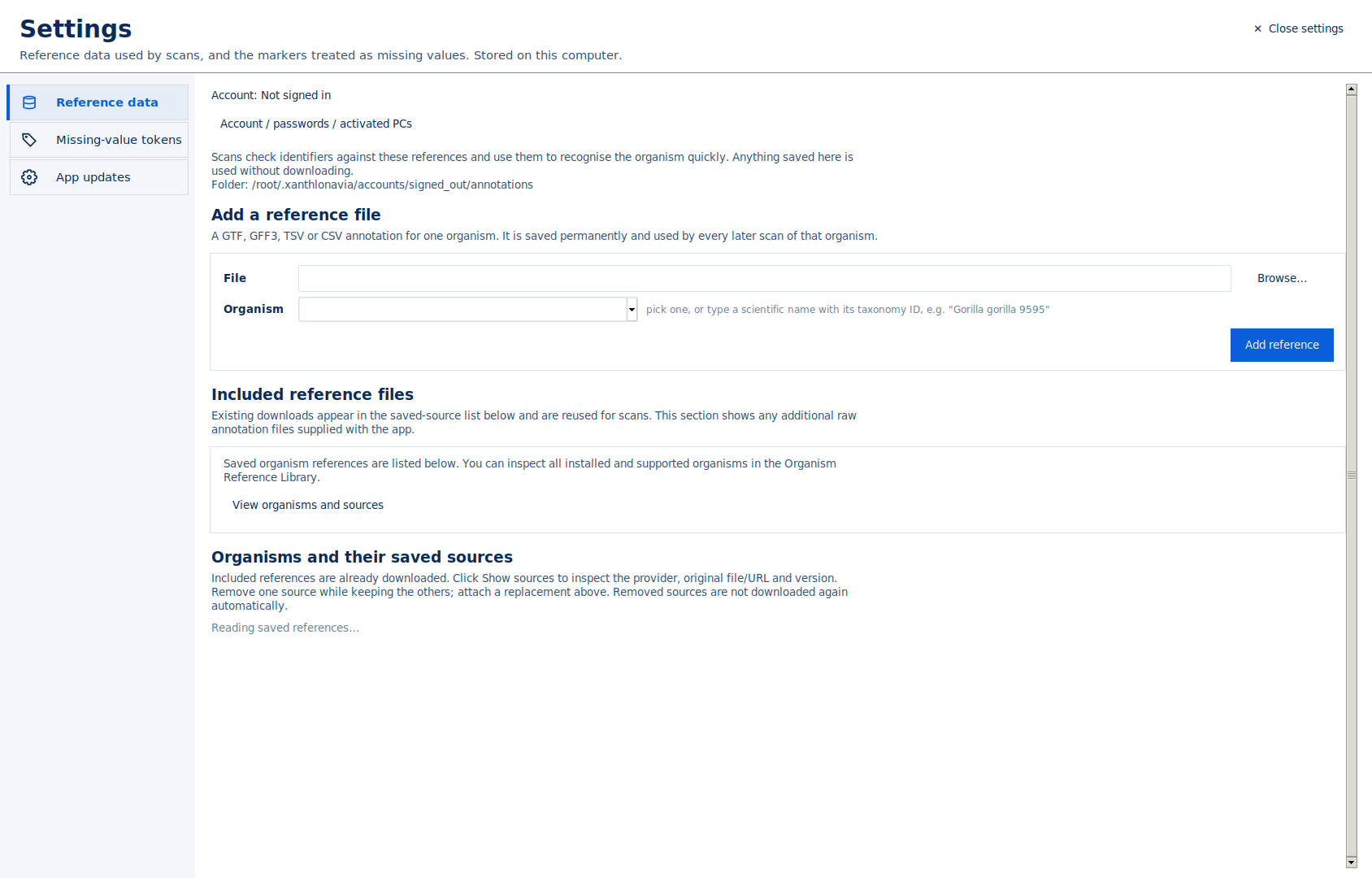
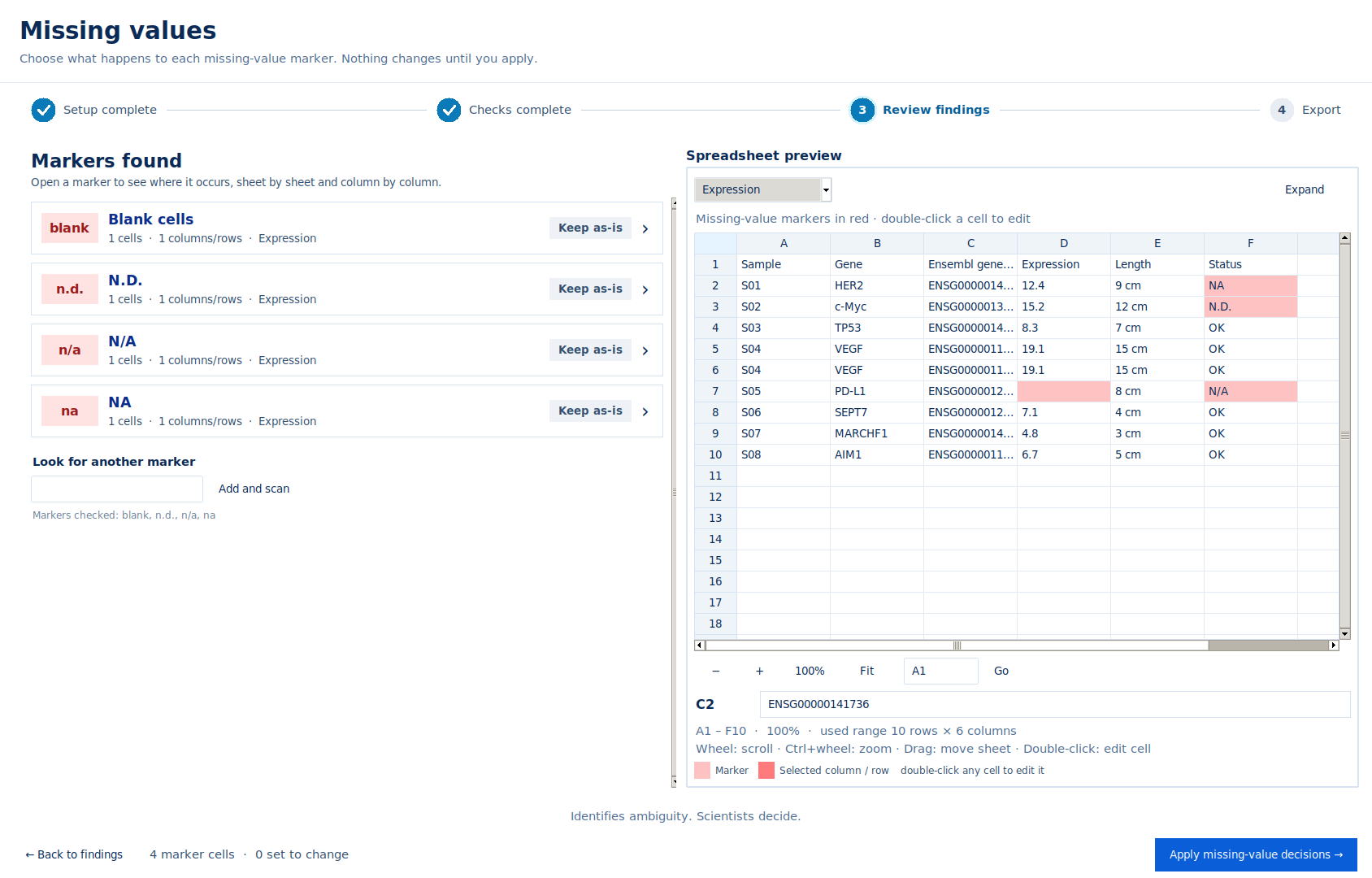
Xanthlonavia finds the markers used for missing data and shows where each one occurs. For each column or row you choose to keep it, make it blank or replace it.
Recognised by default: . Markers that can carry meaning are listed separately so you decide on them: . Blank cells always count as missing. You can switch markers off or add your own in Settings.
Privacy and local processing
Your spreadsheets are processed on your computer
Xanthlonavia is a locally installed application. Normal cleaning and review do not require uploading your laboratory data anywhere.
Processed locally
Workbooks are read, checked and exported on your computer. The original file is never modified; the cleaned copy is saved under a new name.
When it goes online
Downloading reference datasets and searching the organism list use the internet. These requests name the organism or taxonomy ID, not your data.
Reports you control
Bug reports and feedback are prepared on screen for you to copy, save or email yourself. Data files are never attached automatically.
Feature overview
What the beta includes
Current beta limitations
What Xanthlonavia does not assume
Knowing the limits is part of using the tool well. These apply to .
- Biological coverage depends on the references available for each organism. Some organisms have much richer coverage than others.
- Not every organism or identifier namespace is bundled. Study-local identifiers may need a custom reference.
- Not every historical identifier can be resolved. Retired Ensembl IDs need the ID-history file; retired UniProt accessions are not covered.
- A gene name is recognised as belonging to an organism only after that organism's reference has been saved once.
- Ambiguous mappings always require your review, and unsupported annotation structures may need manual checking.
- Xanthlonavia does not replace scientific interpretation. A valid-looking identifier is not necessarily the right one for your experiment.
- Excel input is standard .xlsx. Older .xls and macro-enabled workbooks need to be saved as .xlsx first.
- Formulas are kept as written; their results are not recalculated. Fixed-width text files are not parsed.
- The beta is built and tested for . A version is planned for later.
- Downloading references needs an internet connection; saved references and library files work offline.
Beta access
Download it, then create your account in the app
Help and support
Help is built into the application
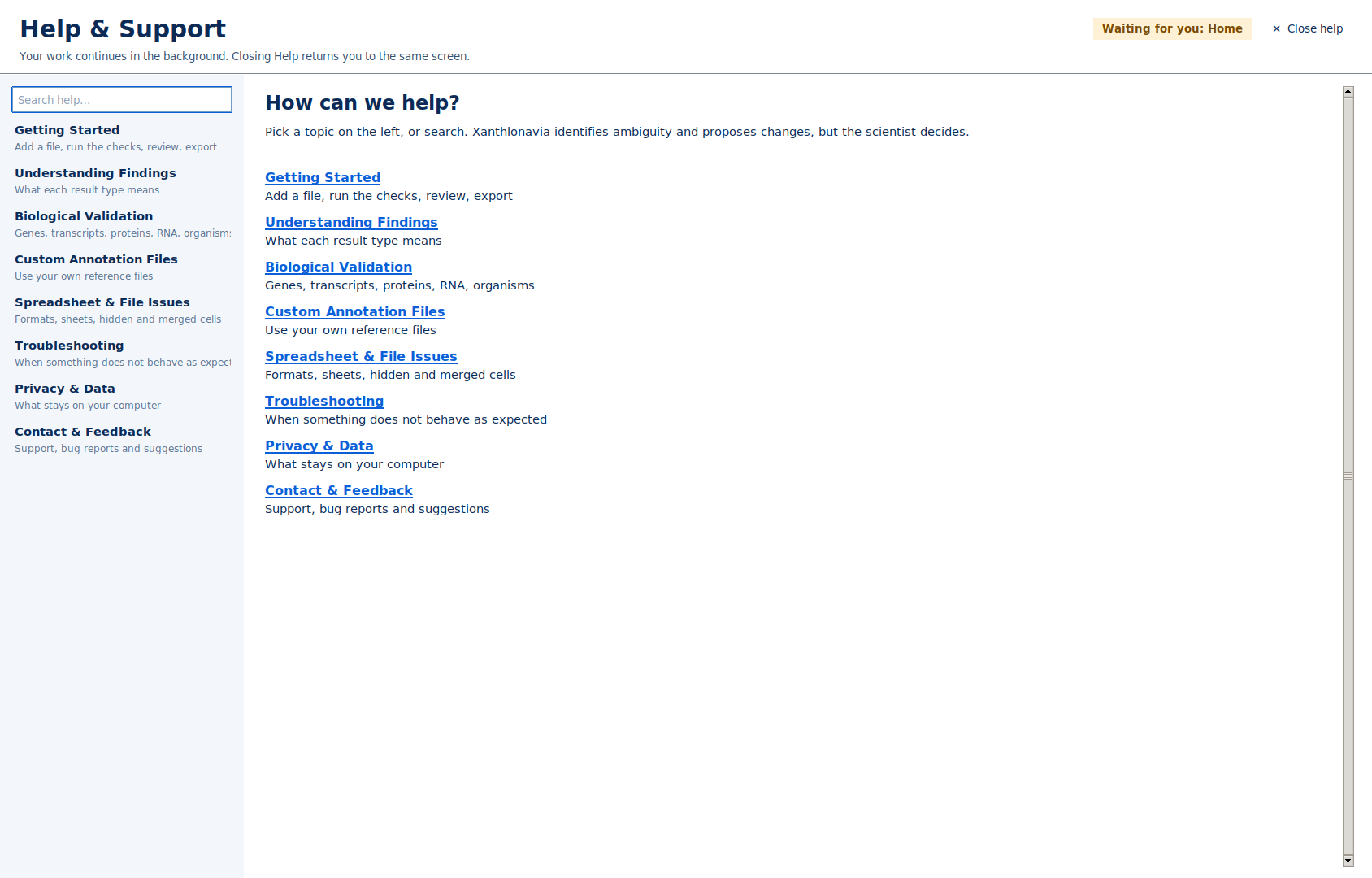
Help & Support opens over the screen you are on, so a running scan continues. It covers getting started, findings, biological validation, custom references and troubleshooting.
Identifies ambiguity. Scientists decide.
Download Xanthlonavia Beta for Windows, then create or sign in to your account inside the application.
Features
What Xanthlonavia checks, and how you stay in control
Every feature listed here exists in , unless it is marked as coming later.
Spreadsheet structure
Structural checks
Units and numbers
Numbers that analysis tools can read
- Numbers stored as text, decimal commas and grouping separators
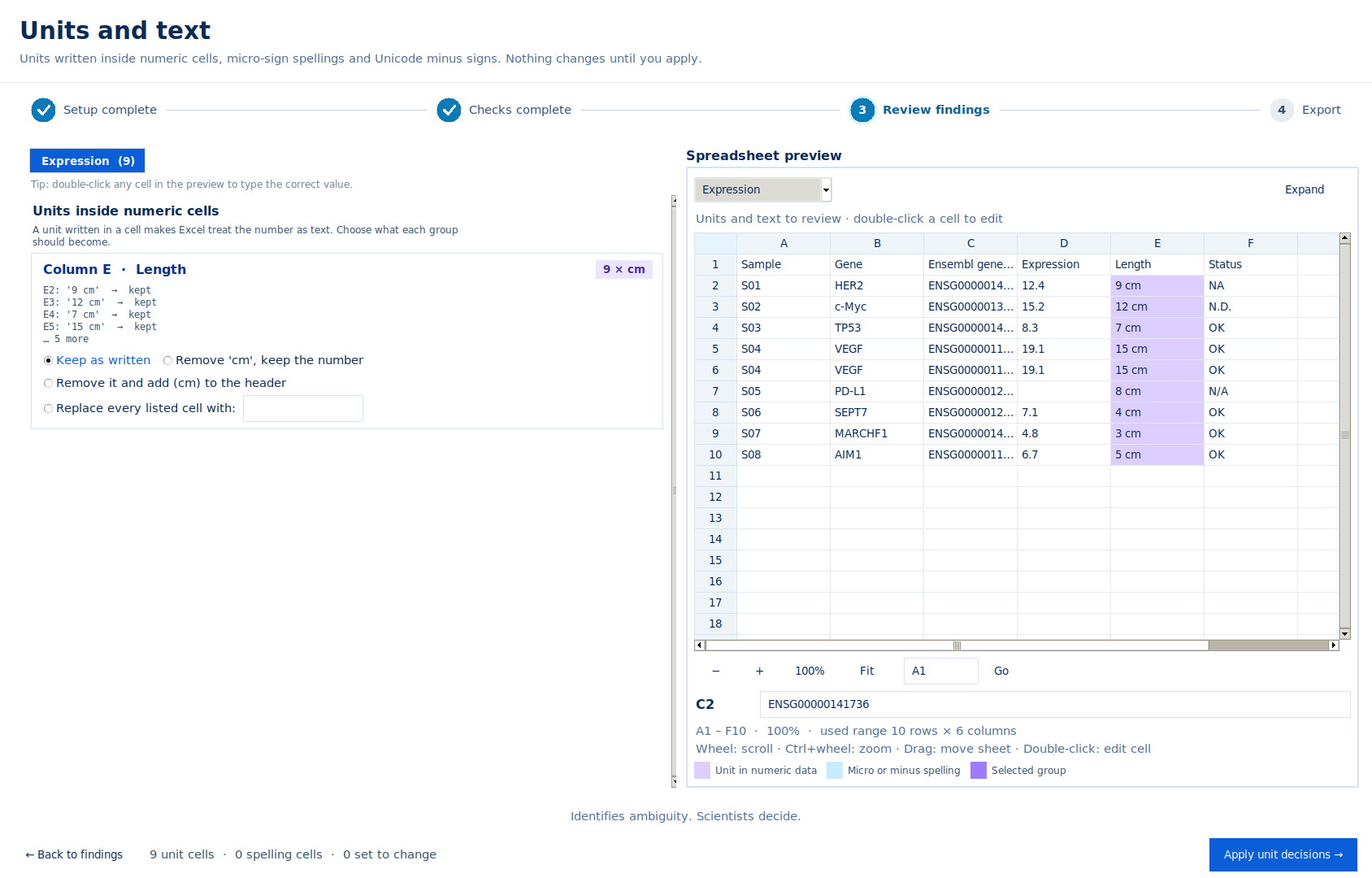
- Units written inside numeric cells, such as
5 µM - Micro-sign spellings (µ, μ, u) and Unicode minus signs
- Scientific notation and expressions inside cells
For units, you choose per group: keep as written, remove the unit and keep the number, or move the unit into the header.
Duplicates
Repeated rows, columns and headers
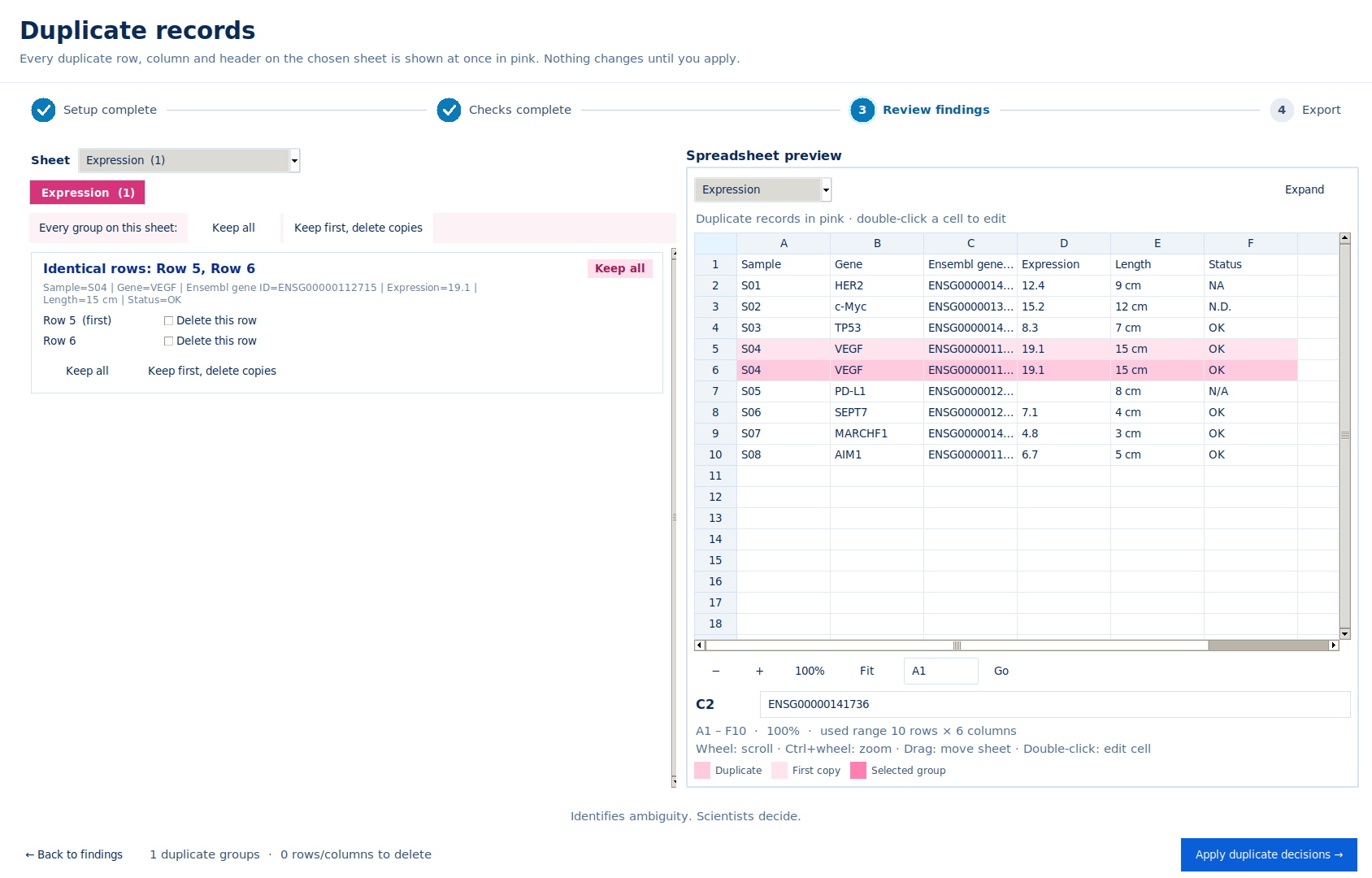
Exact duplicate records and repeated headers are listed with their positions. You keep all, or keep the first and delete the copies.
Repeated gene names are not treated as duplicates on their own: the same gene in two rows can be real data.
Organisms
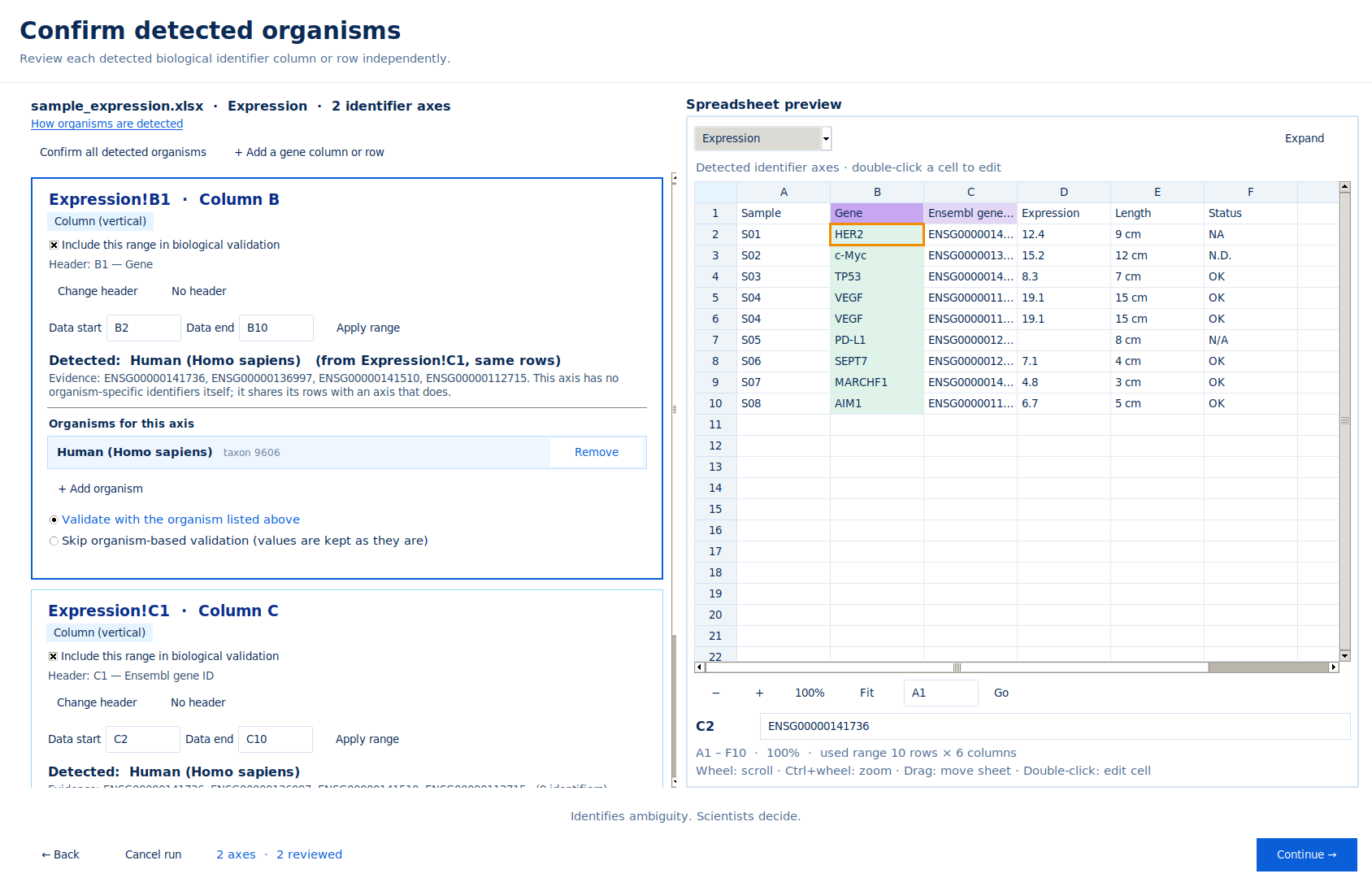
You confirm the organism for each identifier column
Xanthlonavia reports the organism signals it found, such as Ensembl ID prefixes or gene names from saved references, and asks you to confirm. A workbook, sheet or column can hold more than one organism.
How it works
From messy data to reviewed scientific data
Seven steps, the same order in the application. Select a step to see its screen.
After export
A cleaned copy and a record of decisions
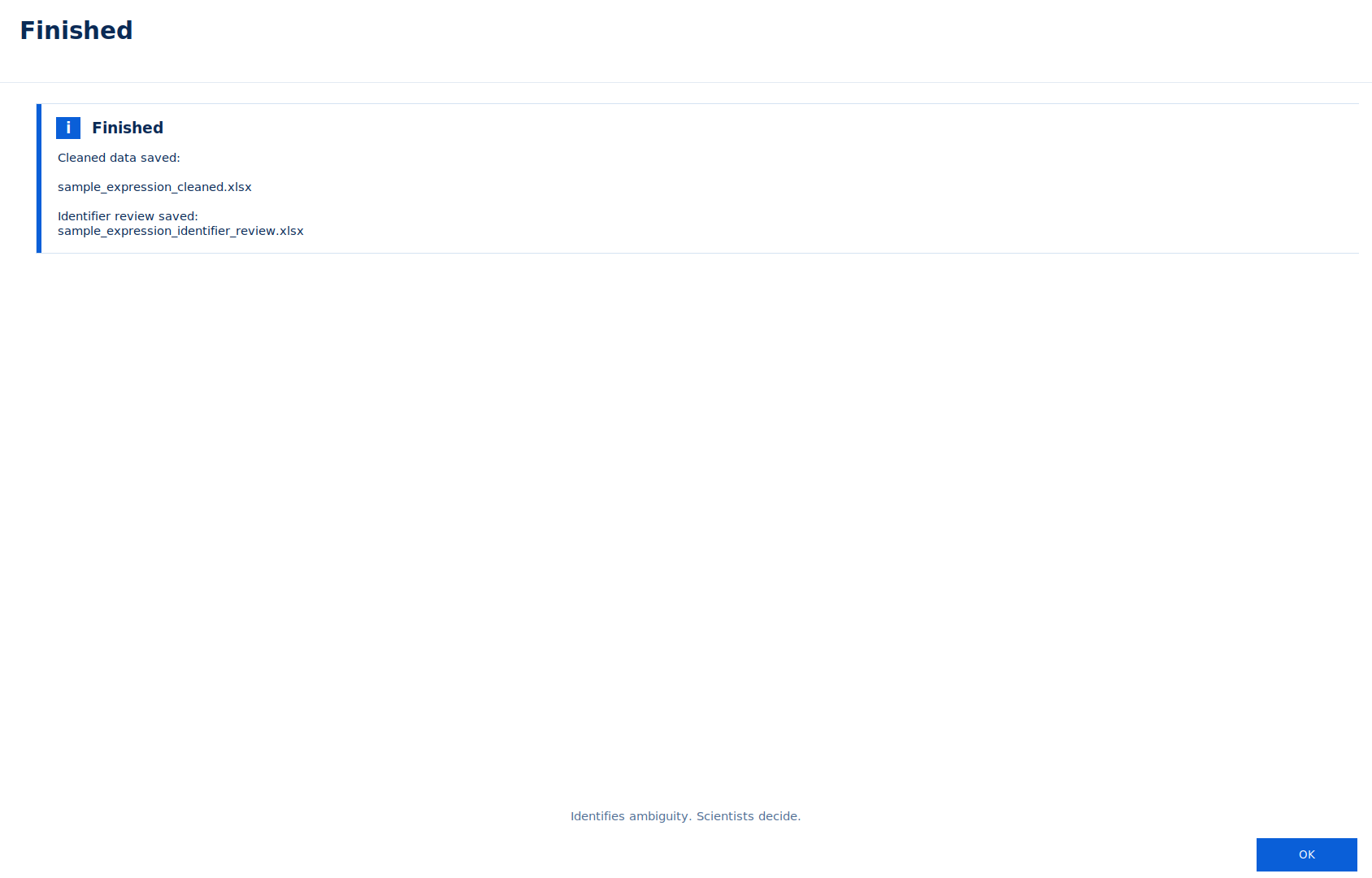
The cleaned file is saved under a new name next to the original, which is never changed. When biological validation was used, an identifier review file records each decision.
Annotation Download Library
Reference files for selected organisms
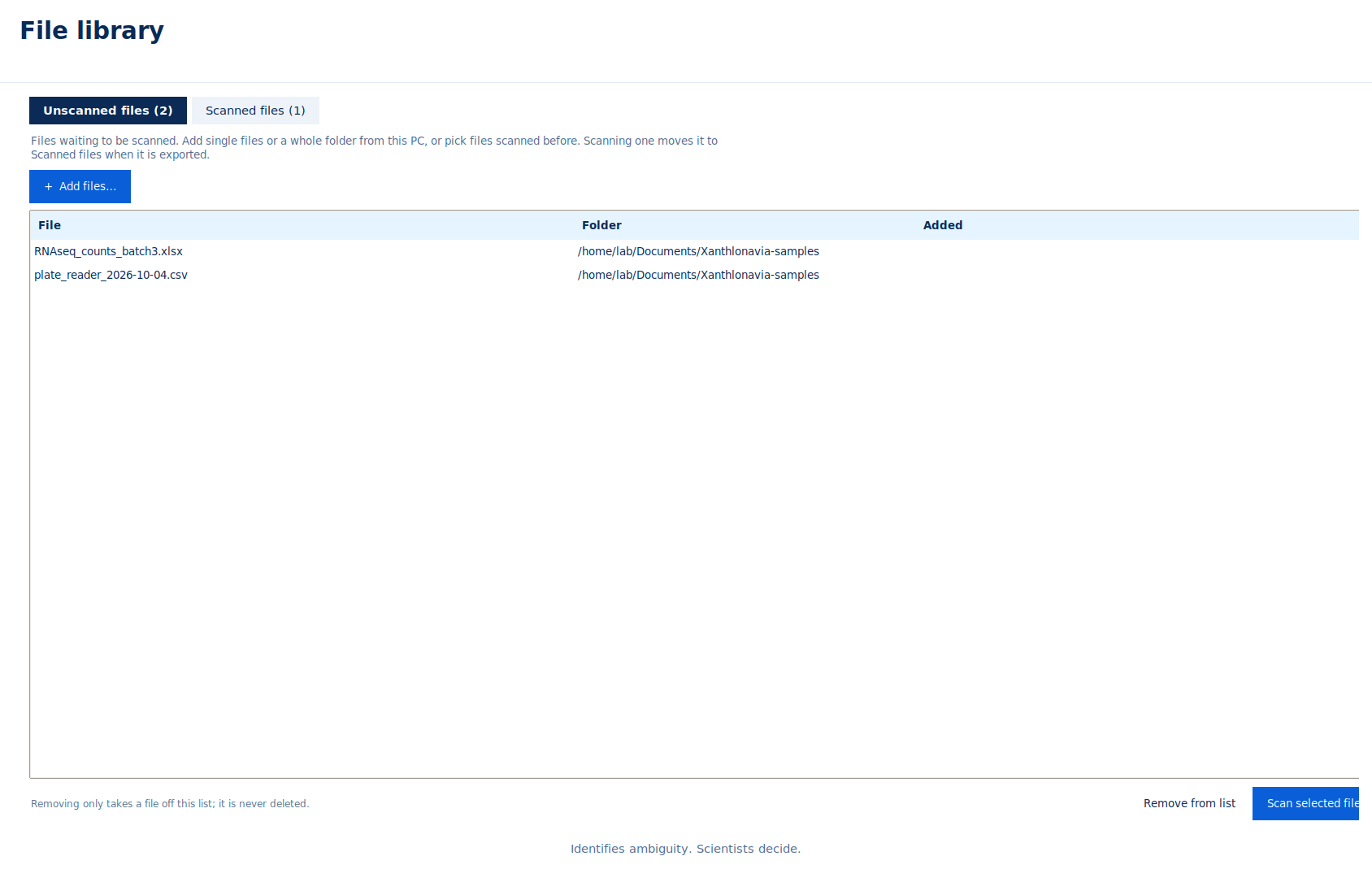
The library is browsed inside Xanthlonavia: search an organism, open it, browse its files and download them. Each file shows its source, release and checksum.
Not every organism has every file type. Bacteria use NCBI RefSeq annotation; the other organisms use Ensembl or Ensembl Genomes releases.
What a library entry can contain
File sections
Files are grouped into these sections in the library. An organism shows only the sections it has.
Settings
Keep the references your laboratory uses
In Settings → Reference data you manage the references stored on your computer. If a compatible reference is saved, scans use it instead of downloading.
See what is saved
Every saved reference with its organism, source, release, gene count and date.
Use library files for scans
"Use for scans" or "Use all" reads library files into the scan references, so those organisms work offline.
Add your own
Add a GTF, GFF3, TSV or CSV file and choose its organism, or type the scientific name and taxonomy ID.
Remove
Removing a reference means the next scan of that organism downloads it again or asks for a file.
Safe during scans
Reference changes are locked while a scan runs; they apply from the next scan.
Used for detection
Saved references also help recognise which organism a gene column belongs to.
Privacy
How Xanthlonavia handles your data
Xanthlonavia is designed as a locally installed application. This page describes what happens on your computer and the specific cases where it connects to the internet.
Processed on your computer
- Spreadsheets are opened, checked, reviewed and exported locally.
- The original file is never modified. Exports are written under a new name and never overwrite an existing file.
- Saved references, settings and the File library are stored under your user folder (
%USERPROFILE%\.xanthlonavia) and separated by signed-in account. - CSV, TSV and TXT files are scanned through a temporary Excel copy in your computer's temporary folder. It is deleted after a successful export; if a review is not finished, the app tells you where it was kept.
When Xanthlonavia uses the internet
- Reference downloads from public sources such as Ensembl, NCBI, HGNC, MGI, UniProt, miRBase, RNAcentral and Rfam. Requests name the organism or taxonomy ID, not your data.
- Organism search: the name you type is sent to NCBI Taxonomy to find matching organisms.
- Account authentication: creating an account, signing in and refreshing a session require an internet connection.
- Shared Annotation Library: the app checks the published catalogue and downloads only the reference file you choose.
- Application updates: the app checks the official release information when you ask it to check for updates.
- Feedback: the message and contact details you enter are sent only when you choose Send Feedback.
What is not sent
- Workbook content is not included in reference requests.
- The beta application contains no usage tracking.
- Workbook files are not attached to feedback. Share an example or diagnostic log only if you deliberately choose to do so after removing confidential content.
Questions about data handling:
Access
Free during the introductory beta
Create an account in the app
Install Xanthlonavia, open it, then create or sign in to your account. You do not need to register separately on this website.
Plans and prices
Laboratories and institutions
Help & Support
Help & Support
Short answers here; the full help is inside the application (Help & Support in the sidebar, or F1).
Getting started
- Choose Add file on Home, or pick a file from the File library.
- Select the sheets and, if needed, a region.
- Confirm identifier classes, organisms and headers.
- Review each findings section, apply your decisions, then export.
Installation and unknown publisher
The beta runs on 64-bit Windows 10 and 11; a version is planned. This release is not yet code-signed, so Windows may show “Unknown publisher” or an unrecognised-app warning. Read the Download page security guidance before running it. Stop if antivirus reports malware or an application-control policy blocks it; contact support or your IT administrator. Keep Windows Security enabled.
File support
- Excel .xlsx, CSV, TSV and delimited TXT.
- CSV, TSV and TXT files are converted into a temporary Excel workbook for scanning. The cleaned result is saved back as CSV, TSV or TXT, and the temporary files are removed after a successful export.
- Save .xls or .xlsm workbooks as .xlsx first.
- Password-protected workbooks must be saved without the password.
- Chart sheets are kept unchanged and skipped by the checks.
Biological validation
- Only ticked identifier classes are validated.
- You confirm the organism for each identifier column or row.
- Not found in the reference does not mean wrong; such values are kept and reported.
Annotation Library
Open Annotation Library in the sidebar, search an organism, open it and download files. "Use for scans" in Settings makes library files available to scans offline.
Custom references
Settings → Reference data → Add a reference file. Choose the organism, or type its scientific name and taxonomy ID. GTF, GFF3, TSV and CSV are accepted.
Troubleshooting
- "File is in use": close it in Excel and try again.
- Saving failed: your cleaned data is kept; choose another folder.
- Unexpected error: use Copy details and send it with Report a Bug.
Account and sign-in
No website registration is required. Download and install Xanthlonavia, then create or sign in to your account inside the application.
Privacy & data
Spreadsheets are processed on your computer. See the Privacy page for the cases where the application uses the internet.
Contact support
Who to contact
Contact form
Send us a message
Describe the problem or suggestion. Version and operating system help with bug reports.
Do not attach research data unless you choose to. If a file helps explain the problem, remove anything confidential first.
Get started
Start with Xanthlonavia Beta
Download the Windows installer. Account creation and sign-in happen securely inside the installed application.
- No separate website registration
- Scientific files remain on your computer
- Your original files are never changed
1. Download the Windows beta
Use the official installer and checksum on the Download page.
2. Install and open Xanthlonavia
Follow the installer steps, then open Xanthlonavia from the Start menu.
3. Create or sign in to your account
Use the account screen in the app. After sign-in, you can start scanning local files.
About
Built for the people who check the data
Xanthlonavia comes from a simple position: software can find where a spreadsheet is ambiguous, but decisions about biological data belong to the scientist.
Founder
·
For questions about Xanthlonavia, collaborations or institutional use:
Download
Download Xanthlonavia
Windows beta version . Download the installer, then create or sign in to your account inside the application.
- Current version
- Operating system
- Coming later
- Release date
- Opens
Direct installer: unsigned beta — publisher not verified by Windows. This release does not yet have a code-signing certificate. Windows may display “Unknown publisher” or an unrecognised-app warning. Read the security guidance below before running it.
Beta software for research use: keep backups of your original files and review results before relying on them.
Release notes
Installation
For Microsoft Store installation, select Get it from Microsoft Store and install from the listing. For the direct installer, follow the steps below.
- Download the installer and its SHA-256 checksum from the official release.
- From the folder containing the download, run
Get-FileHash .\Xanthlonavia-Beta-Setup-1.5.5-x64.exe -Algorithm SHA256in PowerShell and compare it with the official checksum. A matching hash confirms the file matches the release; it does not prove that software is safe. - Run the installer and follow the steps. Administrator rights may be needed.
- Start Xanthlonavia from the Start menu, then create or sign in to your account.
- The 18 bundled organism references are installed with the application; you do not need to download them again.
Unrecognised-app warning. If Microsoft Defender SmartScreen reports only that the app is unrecognised, first check the official download source and checksum. If you understand the risk and trust this release, you may choose More info → Run anyway, when Windows offers it.
Unknown publisher. Windows cannot verify the publisher of this unsigned installer. The warning is not a safety certification; do not assume every security alert is caused by the missing signature.
Malware detection, Smart App Control or policy block? Stop installation and contact support. If there is no “Run anyway” option, do not try to bypass the block. On a laboratory or institution-managed computer, ask your IT administrator to review it.
Keep Windows Security enabled. Do not turn off antivirus, SmartScreen or Smart App Control, and do not add broad security exclusions to install this beta.
Legal
Terms of Service
Last updated:
These terms apply to the Xanthlonavia website and to the Xanthlonavia desktop application ("Xanthlonavia", "we", "us"). By downloading, creating an account or using the software you agree to them.
1. What Xanthlonavia is
Xanthlonavia is desktop software that inspects spreadsheets, detects structural and biological-identifier issues, proposes changes and applies only the changes you approve. It is intended for research use.
2. Beta software
Xanthlonavia is in beta. Features, reference coverage and supported organisms may change between versions, and some functions may not work as expected. Keep your original files; Xanthlonavia never modifies them, but you should keep your own backups.
3. Access and pricing
Xanthlonavia Beta is free to use during its introductory beta period. If paid plans are introduced, their prices and terms will be published and account holders will be told before they apply. Nothing is charged without your agreement.
4. Your responsibility for scientific decisions
Xanthlonavia identifies ambiguity and proposes changes; you decide. It does not replace scientific interpretation. You remain responsible for checking that identifiers, values and exported files are correct and appropriate for your work.
5. Reference data from third parties
Reference datasets come from public sources such as Ensembl, NCBI, HGNC, MGI, UniProt, miRBase, RNAcentral and Rfam, under their own terms. We do not control their availability, accuracy or licences.
6. Acceptable use
- Do not try to break, reverse engineer for misuse, or resell the software.
- Do not use Xanthlonavia for unlawful purposes or in a way that infringes others' rights.
7. Intellectual property
Xanthlonavia, its name, logo and software belong to its founder. Your data and files remain yours.
8. No warranty
Xanthlonavia is provided "as is", without warranties of any kind, to the extent permitted by law.
9. Limitation of liability
To the extent permitted by law, we are not liable for indirect or consequential losses, or for loss of data or research results arising from use of the software.
10. Changes to these terms
We may update these terms. The date above shows the latest version; significant changes may be emailed to account holders.
11. Governing law
These terms are governed by the laws of India.
12. Contact
Legal
Privacy Policy
Last updated:
Who we are
Xanthlonavia is run by its founder, . Contact for anything in this policy: .
Account information
Account creation and sign-in happen inside the desktop application. Authentication requires your email address and stores the information needed to maintain your account and session. If you use an authentication provider, it may also supply a display name or profile picture. An email address by itself is not used to guess a profile picture.
How we use it
- To authenticate your account and provide access to Xanthlonavia.
- To send security, account or important product notices.
- To respond when you deliberately submit feedback or a support request.
We do not sell your information or use it for advertising.
Legal basis and your choices
We use account information to provide the service and rely on consent where required. You can ask to see, correct or delete your account details by emailing . We reply within 30 days.
How long we keep it
Until you delete your account, ask us to delete it, or it is no longer needed to provide Xanthlonavia, subject to legal and security requirements.
Where it is stored
Account and authentication information is stored by the services used to operate Xanthlonavia and may be processed outside your country.
This website
This website does not use advertising or analytics cookies. It loads fonts from Google Fonts, which receives your browser's IP address to deliver them.
The desktop application
Spreadsheets you process with Xanthlonavia stay on your computer and are not sent to us. The application uses the internet for account authentication, update checks, the shared annotation catalogue, reference downloads, organism-name searches and feedback that you choose to submit. These operations do not upload your workbook. It contains no usage tracking. See the Privacy page for details.
Children
Xanthlonavia is intended for researchers and is not directed at children under 18.
Changes
We will update the date above when this policy changes and may email account holders about significant changes.